
Business Direct Calling
2 products to enable business call flow through Microsoft Teams
SIP for Teams
What is it?
SIP for Teams is adding external call functionality (inbound\outbound) to a Microsoft Teams environment. Modernising work call flows away from traditional PABX


Requirements
- Broadband Solutions SIP Trunks (either new or existing)
- Microsoft 365 Phone System Licence addon OR Microsoft 365 E5 or A5 licence (which includes the phone system addon)
- Temp administrative access to customer's M365 tenancy (to setup the integration)
- DIDs for each Teams user or main call flow IVR
Ideal for
- Customers looking to move away from a traditional PABX phone system environment
- Have simple straight forward inbound call flows without complexity
- Moving towards all users using dedicated Teams applications & hardware for all voice calls
How It Works
- Broadband Solutions setup a tenant for each customer on the Teams SBC on AWS architecture
- With M365 admin access, Broadband Solutions link the teams environment to the SBC
- Broadband Solutions set the SIP trunk to point to the SBC and customer PABX (if required)
- DID must be assigned for each Teams user & call flow
SIP for Teams flow
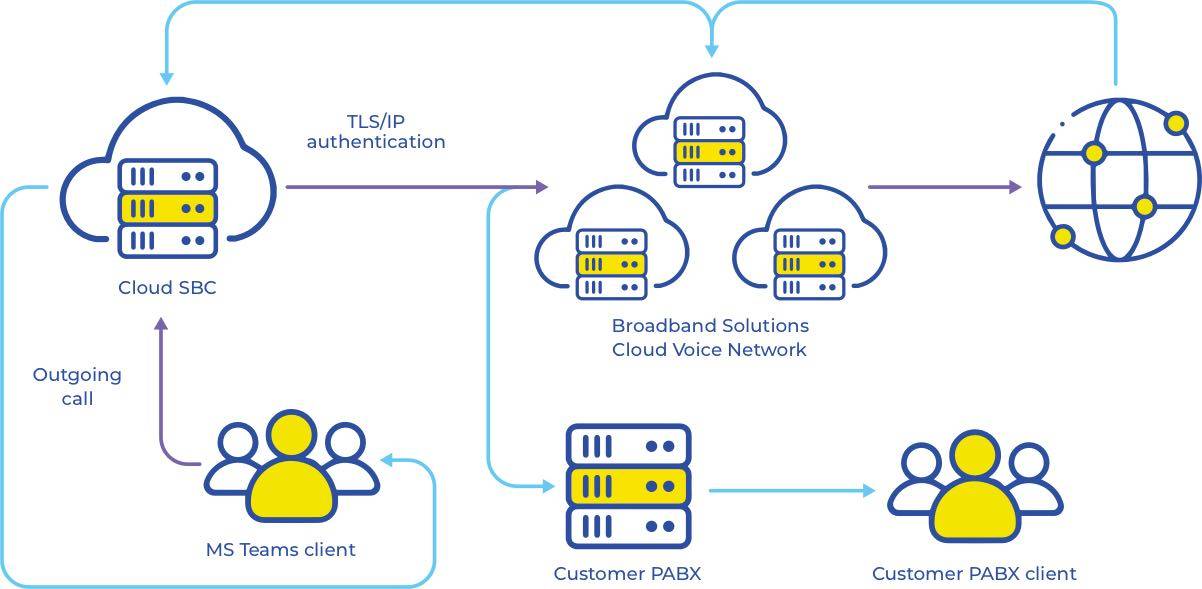
SIP for Teams options
<50 Users
- 24×7 fault ticketing for outages
- Initial call flow configuration
- Voice enablement for each user
51-149 Users
- 24×7 fault ticketing for outages
- Initial call flow configuration
- Voice enablement for each user
>149 Users
- 24×7 fault ticketing for outages
- Initial call flow configuration
- Voice enablement for each user
Add concurrent call unlimited SIP trunk
SIP-10-Unlimited
SIP-20-Unlimited
SIP-30-Unlimited
Frequently asked questions about SIP for teams
Ensure you cater for the amount of concurrent people you need to be on the phone at the 1 time. And yes you can upgrade anytime.
Any teams user, group mailbox, or inbound phone number that is required to be able to answer and\or make phone calls is a user. For example, if your main number rings eight people, that is nine users: one for the main number and one for each person.
24×7 Fault ticketing (for outages) Initial call flow configuration and voice enablement for each user
Moves, adds, changes and deletions after setup. These are charged per request, in business hours only.
Yes, absolutely.
Yes, you can upgrade to add more users at anytime and without downtime.
In AWS architecture, AU region
Technically, YES. So long as your current PABX can handle SIP trunk services (if you need a gateway to convert this, we can supply). SIP service will attempt to ring both PABX and Teams simultaneously, however if the PABX is designed to ‘answer a call and then pass onto the user’ then Teams will stop ringing.
SmartPABX & Teams
What is it?
SmartPABX + Teams is an addon to our SmartPABX Cloud Telephony Solution. It enables integration between the platforms so your people can use a feature rich telephony platform and the Teams collaboration suite together.
Benefits of SmartPABX + Teams
Best of both worlds
Combine an advanced cloud telephony system with the Teams collaboration suite
Handset & Application diversity
Use any SIP compatible device\application as well as Teams based devices & applications
Complex Call flow
SmartPABX has the ability for more advanced user grouping and call flow to meet your business needs
Reporting & Admin portal
SmartPABX comes with an intuitive portal to view and create unlimited reports
Ideal for
- Customers looking for a feature rich telephony platform with the option to combine with Teams if desired
- Customers already using SmartPABX, adding teams is simple and cost effective
- Those looking for a telephony solution with mobility features, but not quite ready for Teams yet and may add it later
- Require more call centre like features and more in depth call reporting
How It Works
SmartPABX Cloud & Broadband Solutions SIP Trunk
The SmartPABX cloud telephony & SIP trunk handles your call flows, groups and reporting.
SBC for teams SmartPABX Addon
This is to connect your Teams Environment to the SmartPABX.
Phone system licence
Each Teams calling user needs the Microsoft Phone System licence add-on in your Microsoft 365 tenancy, or an E5 or A5 licence, which includes it.
SmartPABX & Teams flow
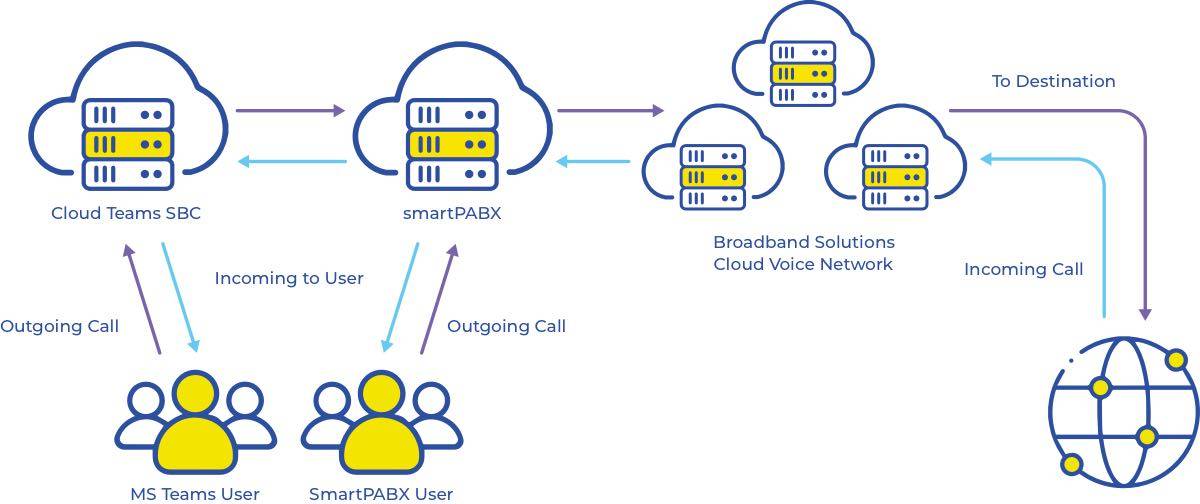
SmartPABX & Teams options

Additional users
Add users at any time, without downtime.
Add concurrent call unlimited SIP trunk
SIP-10-Unlimited
SIP-20-Unlimited
SIP-30-Unlimited
Frequently asked questions about SmartPABX & teams
Yes so long as they are mimicking the same process (like a virtual extension)
Yes, it does not have to be done all at once
Yes they can, but the customer will need to ensure any user who is using Teams has a teams phone system licence addon from microsoft
Yes you can reach your team members by calling their extensions through the Teams interface
SmartPABX does the main call flow, Teams users are added and tied to SmartPABX extension users. Users can use Teams or SmartPABX software as their calling\answering device
Want to know more?
Please fill out your contact details below and one of our amazing solution specialists will be in touch with you shortly!
Broadband Solutions will use these details to respond to your enquiry. See our Privacy Policy.